wordcraft pdfcraft — Read and organize pdf documents
Open wordcraft pdfcraft directly in your browser. Bring an existing file, make your changes, and sign in when you are ready to save or export a private copy.
Office workspace
Introduction
wordcraft pdfcraft: Read a PDF in your browser
Use wordcraft pdfcraft to read and organize PDF documents with a focused, editable workflow. A PDF workbench with page rendering, search, bookmarks, page organization, combining, splitting, comments, and supported form filling. Its browser build uses the same Rust engine as the desktop application and already includes a host communication bridge. Keep an untouched source copy while you inspect the result. A short representative file is a useful first check before committing a complex project to a new editor.
wordcraft pdfcraft: Open a document
In wordcraft pdfcraft, load a PDF and inspect its pages before making changes. The reader provides a focused starting point for everyday document work. Review the surrounding content after each substantial change. The most useful check is whether another person can understand the result without seeing the steps that produced it.
wordcraft pdfcraft: Choose a reading layout
In wordcraft pdfcraft, use supported page layouts and zoom controls to inspect text and images. Check small labels before deciding a page is complete. Choose a file name that describes the purpose and version of the work. This makes later review easier when several related copies exist in your private file library.
wordcraft pdfcraft: Navigate longer files
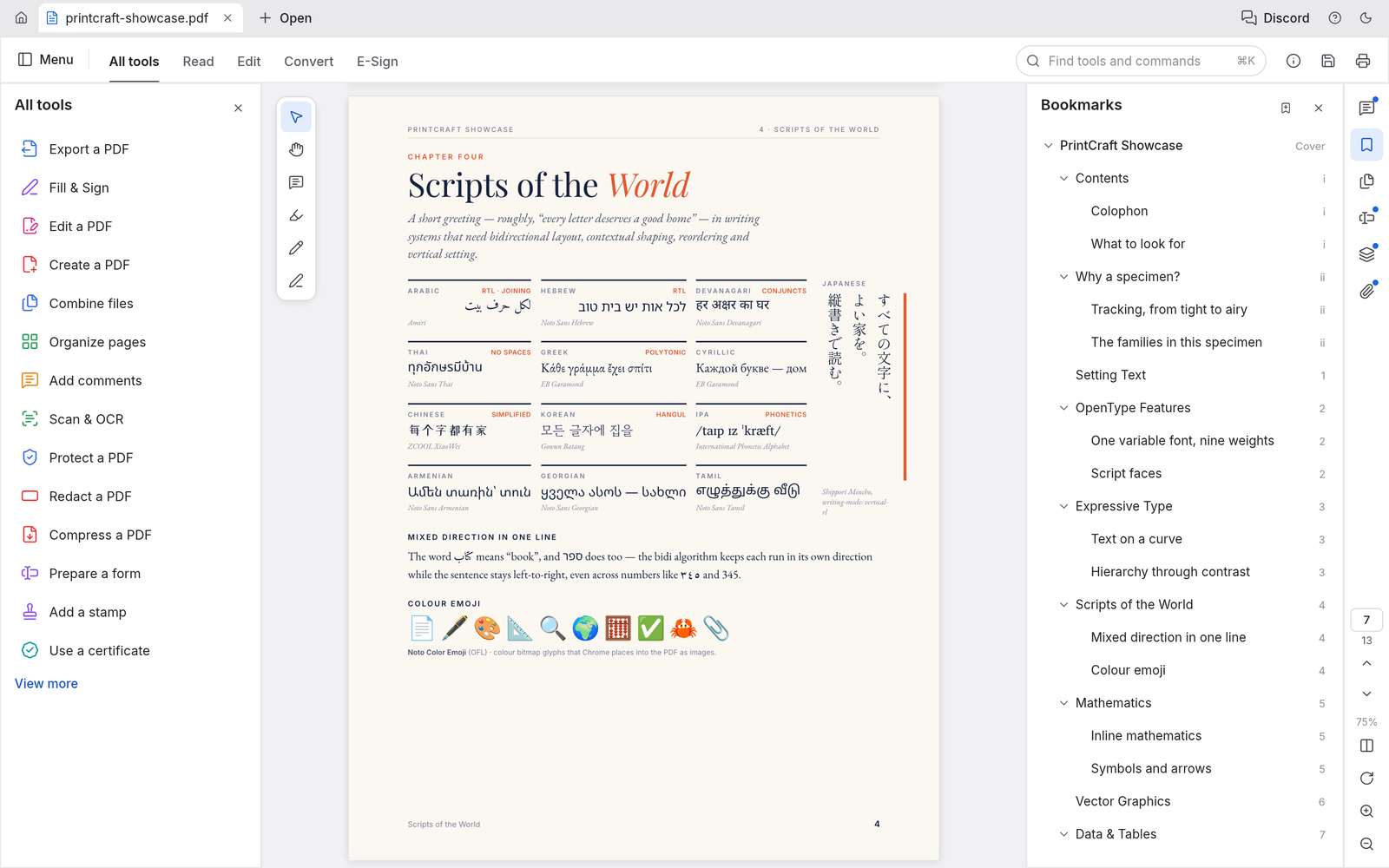
In wordcraft pdfcraft, use thumbnails, bookmarks, and page labels to reach the relevant section. Search helps locate a phrase within a long document. Work through one concrete task at a time, then inspect the result in the format your reader will receive. An editable source and a reading copy serve different purposes.
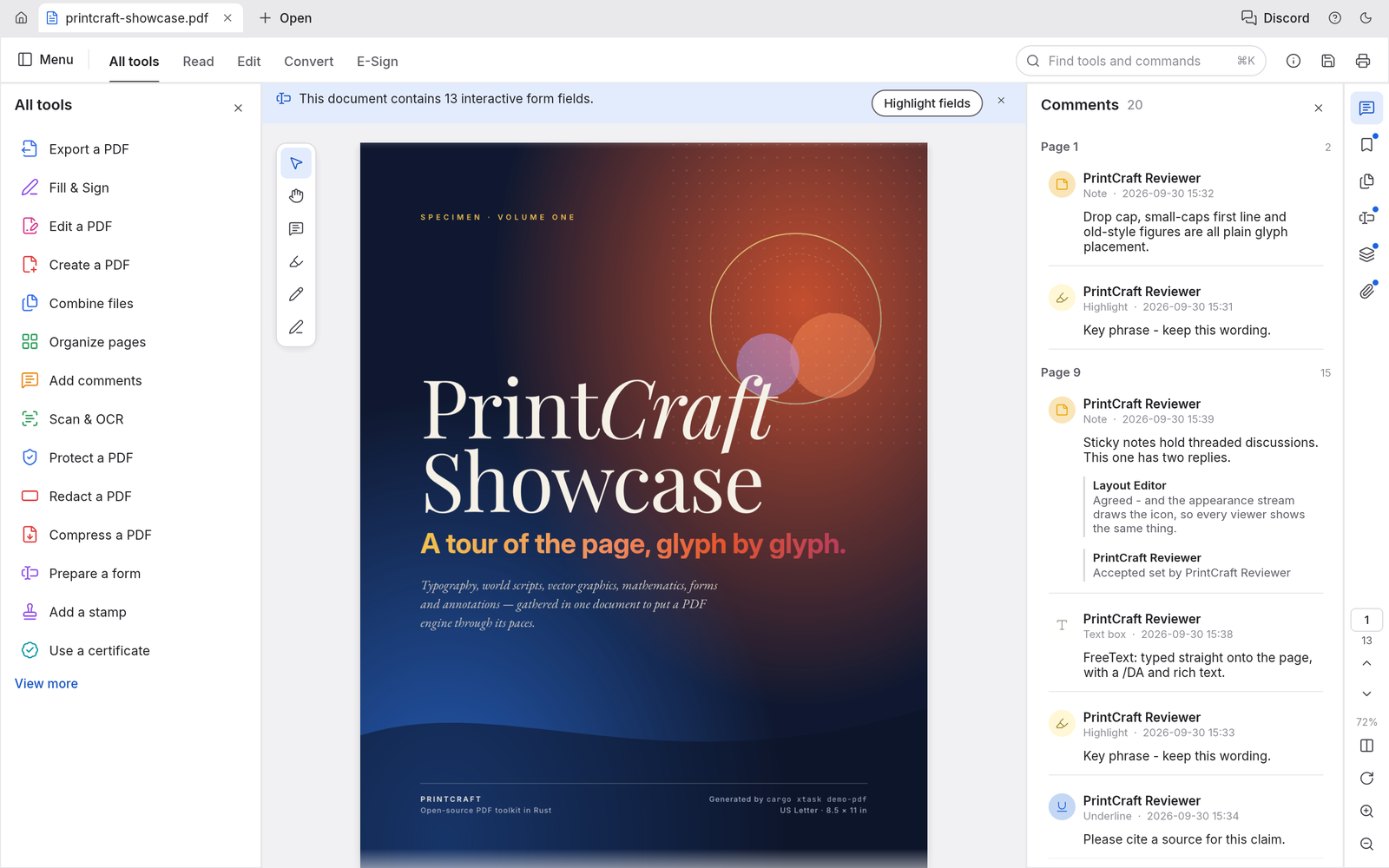
How to use
How to use wordcraft pdfcraft
- STEP 1
Open the workspace
Choose the PdfCraft workspace and open a supported file using the editor menu. Start with a small representative document.
- STEP 2
Make your changes
Use the editor controls to adjust the content, review nearby sections, and check that the result still matches your intended task.
- STEP 3
Sign in to continue
When you save or export, sign in with your account. Your pending file remains in this browser while you complete authentication.
- STEP 4
Save and inspect
Save a private copy, check the recorded result in your files, and inspect the downloaded output before sharing it with another person.
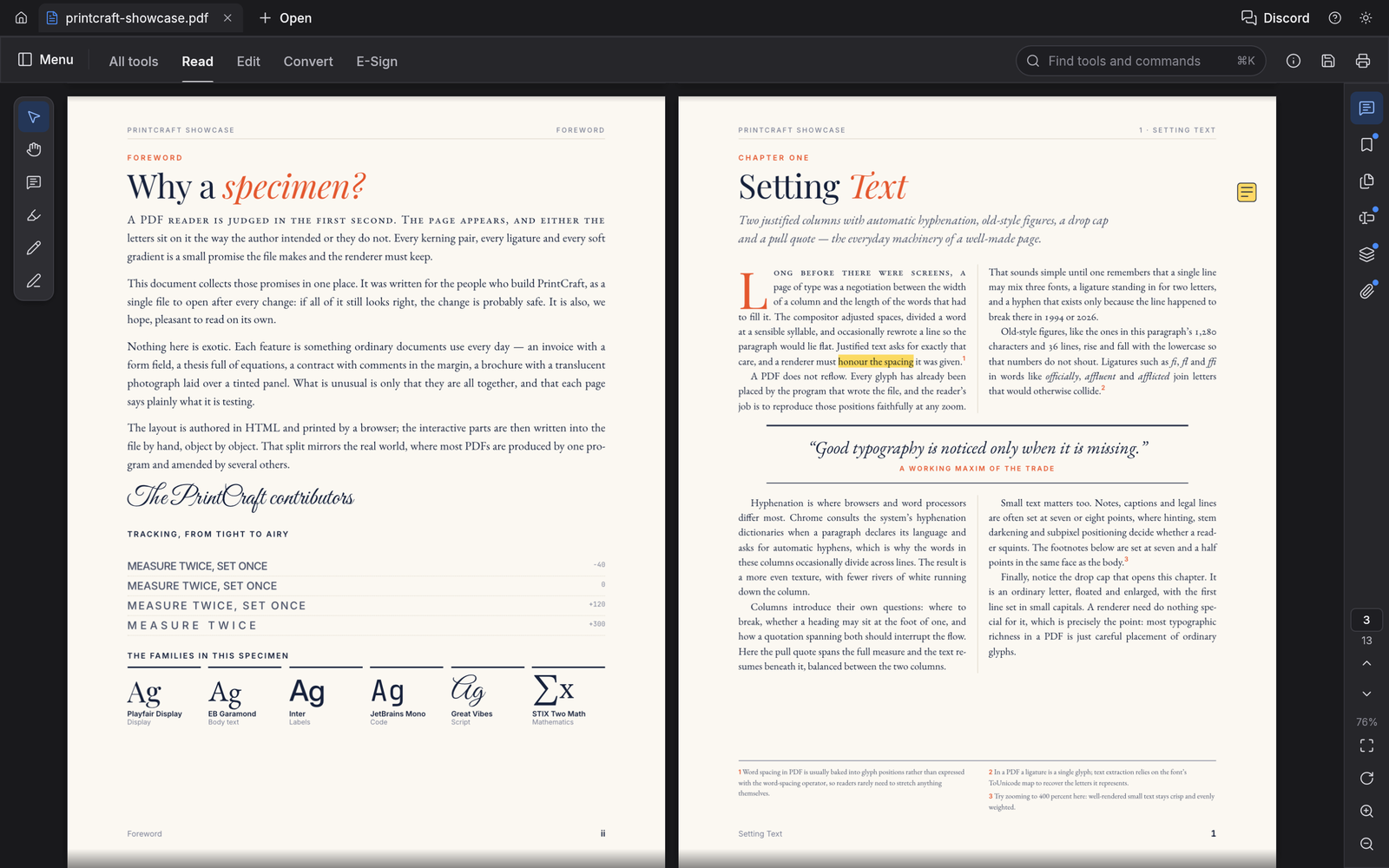
Features
wordcraft pdfcraft: Organize pages visually
Use wordcraft pdfcraft to read and organize PDF documents with a focused, editable workflow. A PDF workbench with page rendering, search, bookmarks, page organization, combining, splitting, comments, and supported form filling. Its browser build uses the same Rust engine as the desktop application and already includes a host communication bridge. Review the surrounding content after each substantial change. The most useful check is whether another person can understand the result without seeing the steps that produced it.
wordcraft pdfcraft: Reorder a document
In wordcraft pdfcraft, inspect page thumbnails and move pages into a useful sequence. Check references and page numbers after changing the order. Choose a file name that describes the purpose and version of the work. This makes later review easier when several related copies exist in your private file library.
Rotate and remove pages
In wordcraft pdfcraft, rotate pages that were scanned sideways and remove pages you no longer need. Review the selection before saving a new copy. Work through one concrete task at a time, then inspect the result in the format your reader will receive. An editable source and a reading copy serve different purposes.
Insert supporting pages
In wordcraft pdfcraft, add pages from another file or insert a blank page where needed. Confirm the combined order before sharing. The browser workspace is available before sign-in. Account authentication is required when you want the site to retain a saved result or provide an exported download.
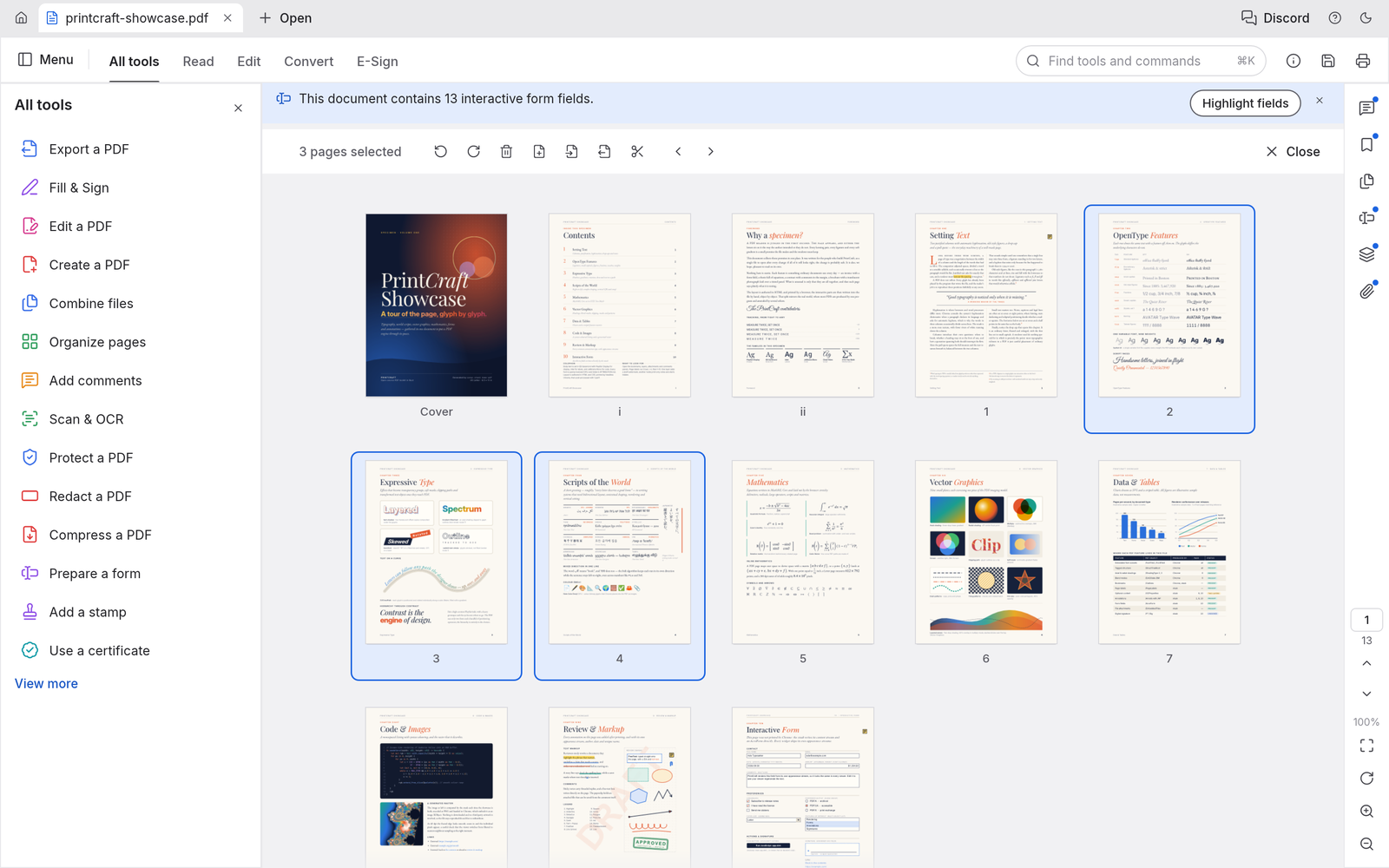
wordcraft pdfcraft: Combine, extract, and split
Use wordcraft pdfcraft to read and organize PDF documents with a focused, editable workflow. A PDF workbench with page rendering, search, bookmarks, page organization, combining, splitting, comments, and supported form filling. Its browser build uses the same Rust engine as the desktop application and already includes a host communication bridge. Choose a file name that describes the purpose and version of the work. This makes later review easier when several related copies exist in your private file library.
Combine related files
In wordcraft pdfcraft, merge related PDFs into one document. Inspect bookmarks, links, forms, and attachments that matter to your particular files. Work through one concrete task at a time, then inspect the result in the format your reader will receive. An editable source and a reading copy serve different purposes.
Extract selected pages
In wordcraft pdfcraft, create a smaller document from selected pages. Check that the result includes the context a reader needs. The browser workspace is available before sign-in. Account authentication is required when you want the site to retain a saved result or provide an exported download.
Split a long document
In wordcraft pdfcraft, divide a PDF into smaller files using supported splitting tools. Give each output a meaningful name and verify the page ranges.
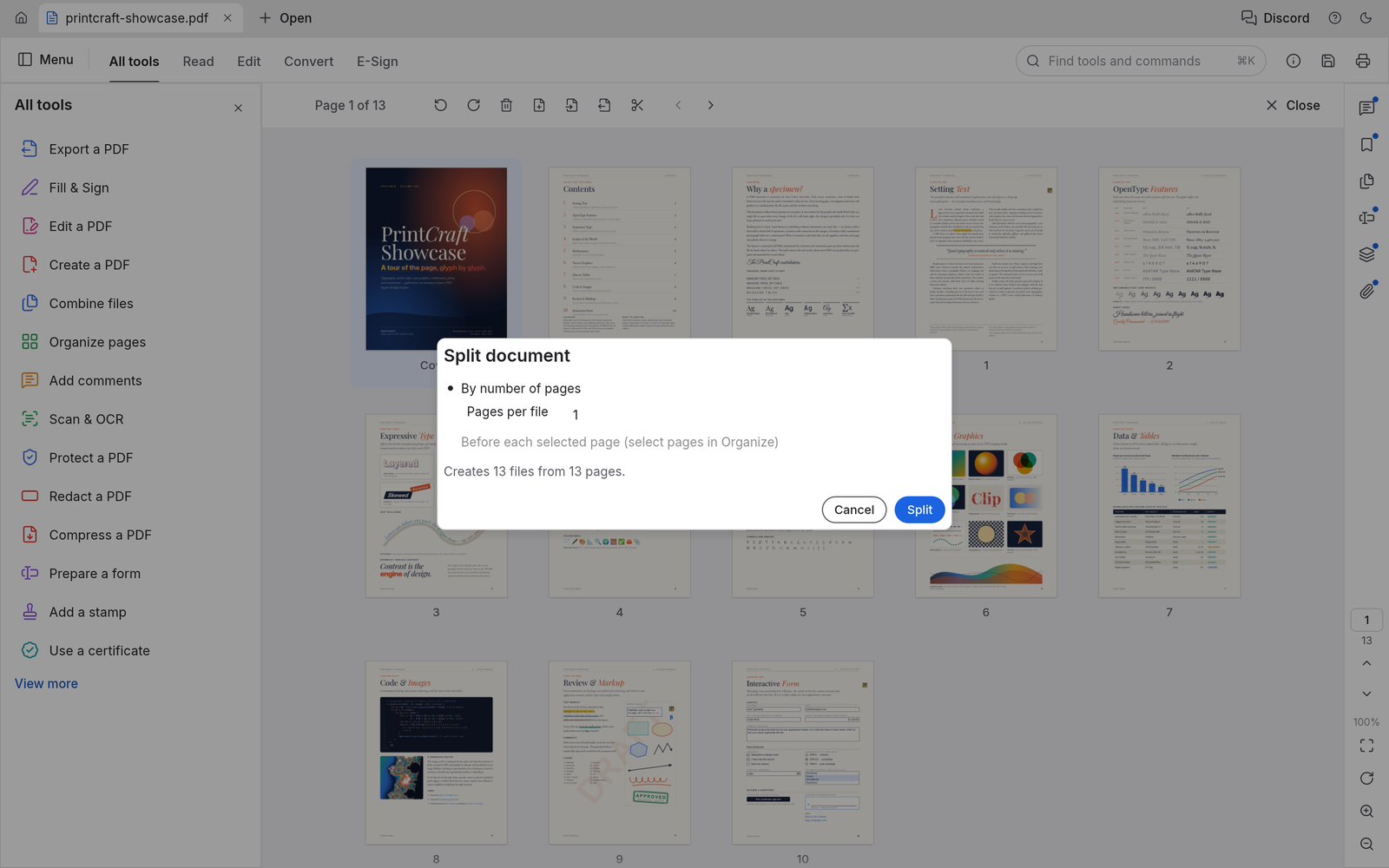
wordcraft pdfcraft: Search, comments, and forms
Use wordcraft pdfcraft to read and organize PDF documents with a focused, editable workflow. A PDF workbench with page rendering, search, bookmarks, page organization, combining, splitting, comments, and supported form filling. Its browser build uses the same Rust engine as the desktop application and already includes a host communication bridge. Work through one concrete task at a time, then inspect the result in the format your reader will receive. An editable source and a reading copy serve different purposes.
Find a passage
In wordcraft pdfcraft, search text and inspect matches in their page context. Text extraction depends on how the original PDF stores its content.
Annotate a review
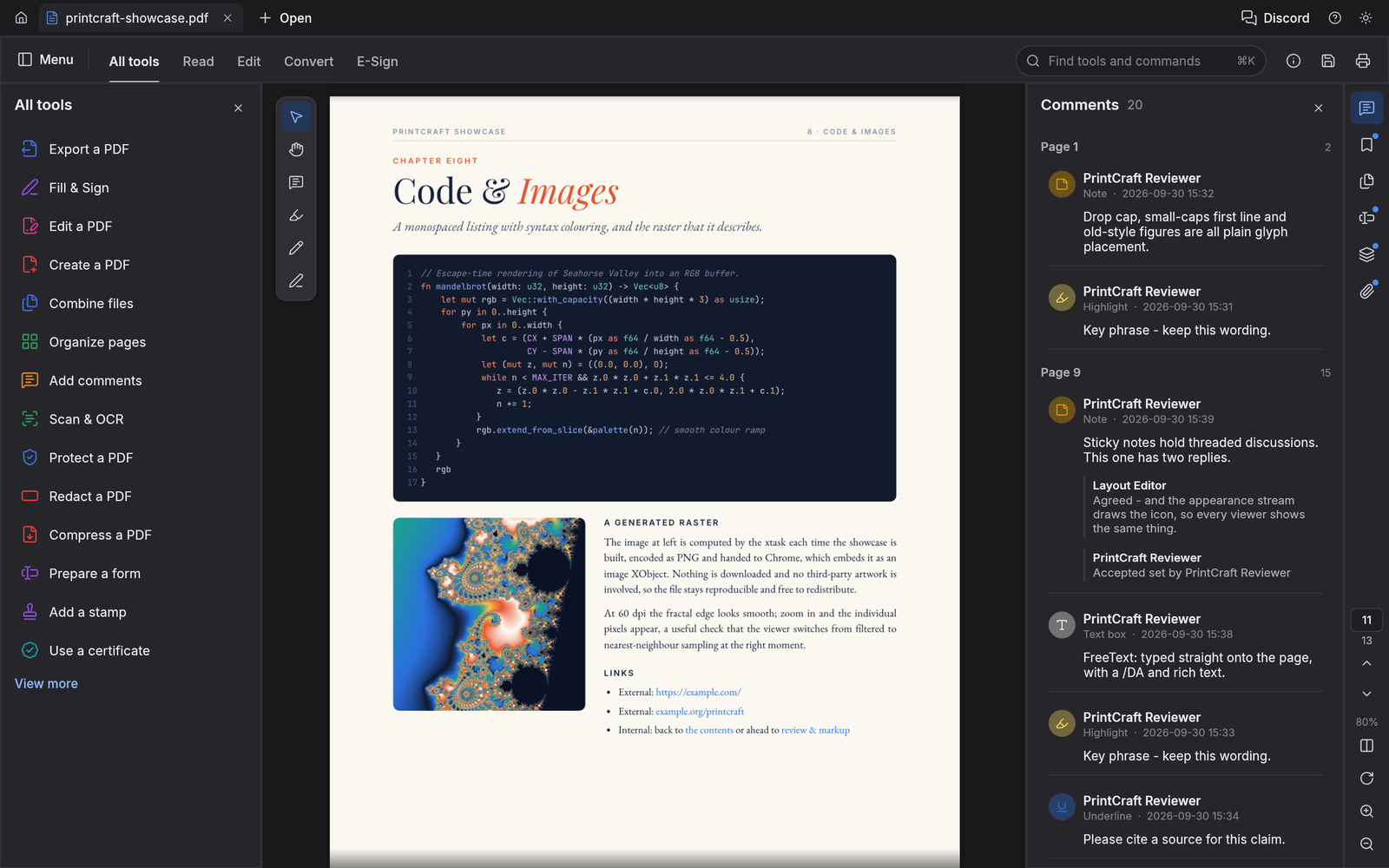
In wordcraft pdfcraft, add supported comments and markup to communicate a change. Keep the annotation connected to the passage or area being discussed.
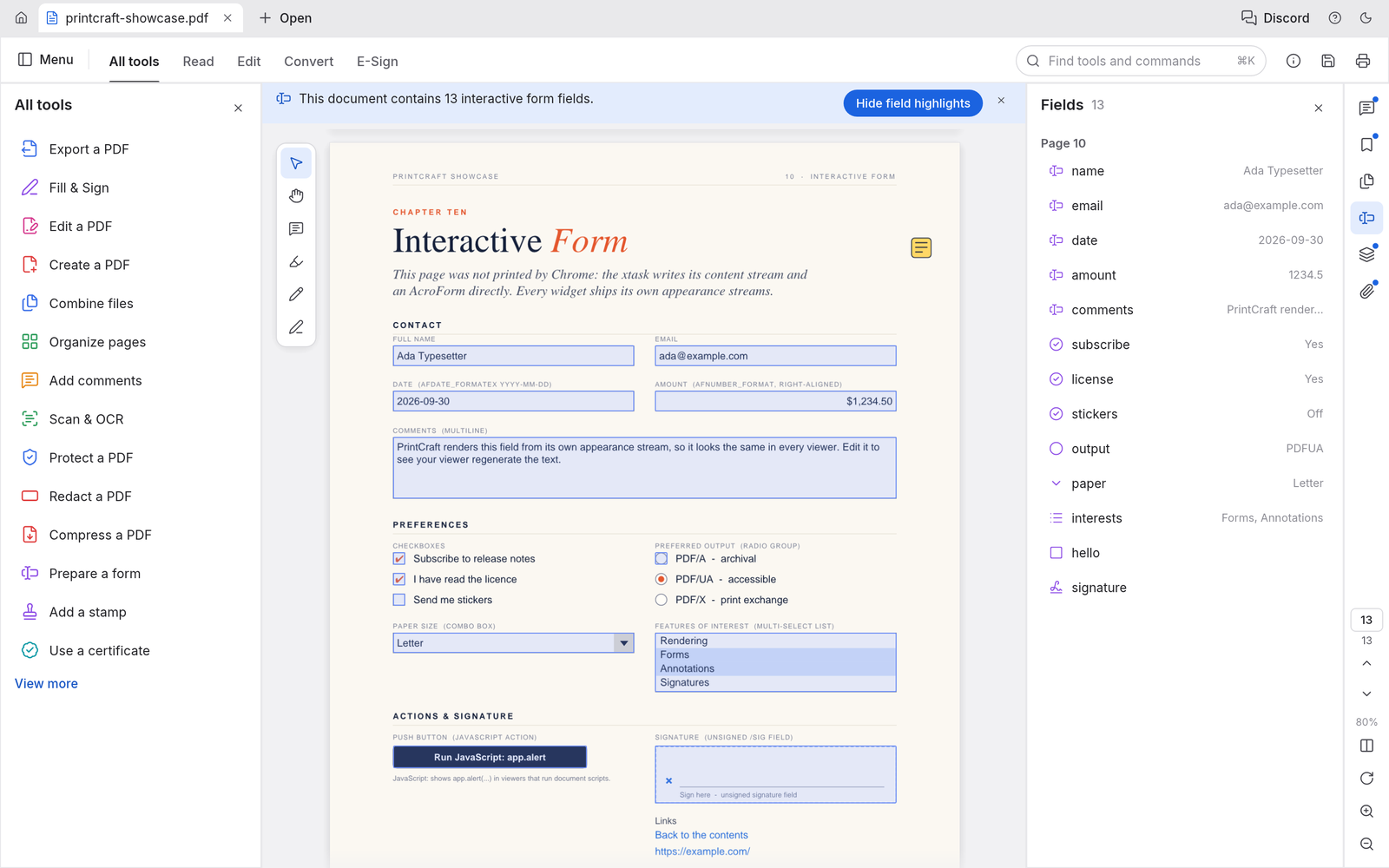
Fill supported fields
In wordcraft pdfcraft, inspect interactive form fields and enter the requested information. Open the saved PDF to confirm the values are retained.
wordcraft pdfcraft: Private saves and PDF copies
Use wordcraft pdfcraft to read and organize PDF documents with a focused, editable workflow. A PDF workbench with page rendering, search, bookmarks, page organization, combining, splitting, comments, and supported form filling. Its browser build uses the same Rust engine as the desktop application and already includes a host communication bridge. The browser workspace is available before sign-in. Account authentication is required when you want the site to retain a saved result or provide an exported download.
Keep the source available
In wordcraft pdfcraft, work from a copy when reviewing a PDF that matters. The upstream engine supports incremental edits, but every workflow still needs verification.
Sign in before saving
In wordcraft pdfcraft, the embedded editor sends saved bytes to the site. Authentication is checked before the private file is written to storage.
Find the finished result
In wordcraft pdfcraft, saved files are associated with your account and recorded in AI Tasks. Download the saved copy when you need to share it.
wordcraft pdfcraft: Practical PDF workflows
Use wordcraft pdfcraft to read and organize PDF documents with a focused, editable workflow. A PDF workbench with page rendering, search, bookmarks, page organization, combining, splitting, comments, and supported form filling. Its browser build uses the same Rust engine as the desktop application and already includes a host communication bridge. Complex imported files deserve extra attention. Compare layout, text, values, and supported objects with the source before treating an exported copy as the final version.
Prepare a reading pack
In wordcraft pdfcraft, collect the relevant pages from several documents. Organize them into a clear order and review the combined file.
Review a form
In wordcraft pdfcraft, read the instructions, fill supported fields, and add comments where clarification is needed. Confirm the saved result before sending it.
Keep expectations precise
In wordcraft pdfcraft, browser OCR and some Office conversions remain gaps upstream. Use the available PDF workflow without assuming every Acrobat feature is present.
User reviews
Feedback on the inherited AI video tools.
AI video creator reviews

I made a full character PV for my game with MiniMax H3 in one afternoon. The menu UI stayed readable in every frame and the character never went off-model. That used to cost me a contractor and three weeks.

We tested every AI video generator on the market for stylized work. H3 is the only one that held our anime style across cuts. We now use it for pitch reels and animatics on every project.

I uploaded four product photos and got a listing video with music and a voiceover the same day. My click-through rate on the new listings is up 38%. H3 even got the label text on my packaging right.

I ship five vertical videos a week for three brands. MiniMax H3 gets me from brief to draft in under an hour, with sound already synced. My old workflow needed a videographer and two review rounds.

The editing side is what sold me. A client wanted the background of an interview changed — I typed one sentence into MiniMax H3 and the lighting on the subject matched the new scene automatically.

I previsualized my entire short film in MiniMax H3 before we shot a single frame. Rack focus, match cuts, even the title cards — it understands director language, not just keywords.
Local editing and document saves use no AI generation credits. Sign in to save or export.
wordcraft Pricing and Credit Plans
Cancel anytime
Lite
50% off0.025 / credit
Billed $ yearly179· Save $179.8
Video Models


Image Models



- Includes MiniMax H3 and all premium models
- Up to 1 batch generation task
- Standard generation speed
- Standard generation success rate
- Standard customer support
- Commercial Use License
Standard
50% off0.017 / credit
Billed $ yearly299· Save $299.8
Video Models
Image Models
- Includes MiniMax H3 and all premium models
- Up to 4 batch generation tasks
- Priority processing speed
- High generation success rate
- Priority customer support
- Commercial Use License
Pro
50% off0.014 / credit
Billed $ yearly599· Save $599.8
Video Models
Image Models
- Includes MiniMax H3 and all premium models
- Up to 10 batch generation tasks
- Fastest generation speed
- High generation success rate
- Dedicated account manager
- Commercial Use License
Max
50% off0.012 / credit
Billed $ yearly1,199· Save $1,199.8
Video Models
Image Models
- Includes MiniMax H3 and all premium models
- Up to 10 batch generation tasks
- Fastest generation speed
- High generation success rate
- Dedicated account manager
- Commercial Use License
Pay safely and securely with





















FAQ
Frequently asked questions
What is wordcraft pdfcraft?
wordcraft pdfcraft is the PdfCraft browser workspace on wordcraft.fast, built from the open-source storytold project. It helps you read and organize PDF documents. The site adds account-based saving and file records around the editor.
Do I need an account to try wordcraft pdfcraft?
You can open wordcraft pdfcraft and work with local files before signing in. Saving to the site or exporting a result requires authentication. A pending save is kept in this browser while you sign in.
Where does wordcraft pdfcraft save my files?
wordcraft pdfcraft saves results in the site’s private user storage. Each completed operation creates an AI Tasks record with the file name and output reference. Access to the saved file is checked against the owning account.
Can wordcraft pdfcraft open every PDF file?
wordcraft pdfcraft uses an upstream editor that is still in alpha. Supported files can be opened and edited, but complex layouts and advanced features need a comparison with the source. Keep the original and inspect exports.
Does wordcraft pdfcraft charge credits for local editing?
wordcraft pdfcraft runs editing in your browser. These document saves are recorded as zero-credit operations. The site’s separate AI image and video tools keep their own displayed pricing and generation workflow.
CTA
Start working with wordcraft pdfcraft
Bring a file to wordcraft pdfcraft, make a focused change, and inspect the result. Sign in when you are ready to save your private copy.
Open the workspace